








How to set Continuous Shooting
Solution
You can shoot continuously at a maximum speed of approximately 0.9 images/second while the <shutter button> is pressed fully and held. (When shooting continuously in [Low Light] ( ) mode, the maximum speed is approximately 2.6 images/second)
) mode, the maximum speed is approximately 2.6 images/second)CAUTION
- For continuous shooting, the focus and exposure are locked when the <shutter button> is pressed halfway.
- For a certain interval, images may not be recorded, and the shooting speed for may slow down depending on the shooting conditions and the camera settings.
- As the number of images increases, the shooting speed may slow down.
- If the flash fires, the shooting speed may slow down.
- In the following shooting modes, you cannot set the [Continuous Shooting] (
 ).
).
- [AUTO] ( ), [Face Self-Timer] (
 ), [Movie] (
 )
)
), [Face Self-Timer] (), [Movie] ()1. Set the <Mode Switch> to  [Shooting] (
 ) and then press
  the <Power> button.
[Shooting] () and then press the <Power> button.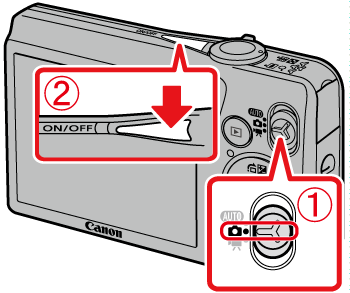
2. Press the <FUNC./SET> ( ) button.
) button.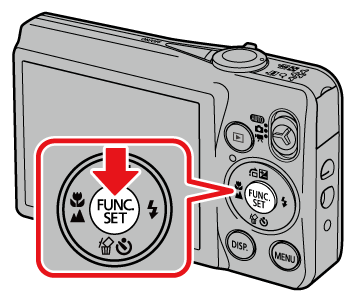
3. The following screen appears on the LCD monitor.
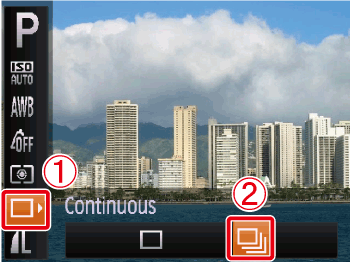
Operate the <directional buttons> up or down to select the [Single Shot] ( ).
).
[Single Shot] ().Operate the <directional buttons> left or right to select the [Continuous Shooting] ( ).
).
[Continuous Shooting] ().Press the <FUNC./SET> () button.
) button.4. The following screen appears on the LCD monitor.
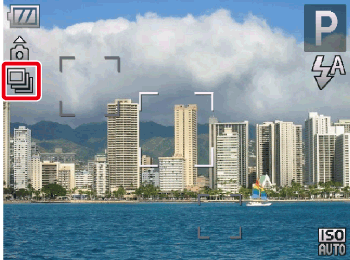
If the [Continuous Shooting] () icon is displayed on the upper-left part of the screen, the setting is completed.
) icon is displayed on the upper-left part of the screen, the setting is completed.As long as you hold the <shutter button> down, the camera will shoot successive images.
NOTE
- Continuous shooting speed increases in [Low Light] () mode. (Approx. 2.6 images/sec.)
- To set the shooting mode to [Low Light] () , follow the instructions below.
) , follow the instructions below.1. Set the <Mode Switch> to [Shooting] ( ).
).
).2. Press the <FUNC./SET> () button.
) button.3. Operate the <directional buttons> up or down to select [Shooting Mode] is displayed on the upper-left part of the screen. ( [Program AE] ( ) appears if settings have not been changed before.)
) appears if settings have not been changed before.)4. Operate the <directional buttons> left and right to select [Shooting Mode] on the right. ( [Face Self-Timer] () appears if settings have not been changed before.)
) appears if settings have not been changed before.)5. Press the <DISP.> ( ) button.
) button.6. Operate the <directional buttons> left or right to select [Low Light] ().
).7. Press the <FUNC./SET> () button.
) button.