







How to Register the Sender Information(MF4150)
Solution
1. Press [Additional Functions].
2. Use [Left cursor] or [Right cursor] to select [5 FAX SETTINGS], then press [OK].
3. Confirm that [1 BASIC SETTINGS] is displayed, then press [OK].
4. Confirm that [1 UNIT TELEPHONE #] is displayed, then press [OK].
5. Use the numeric keys to enter your fax/telephone number (max. 20 digits, including spaces), then press [OK].

6. Confirm that [1 BASIC SETTINGS] is displayed, then press [OK].
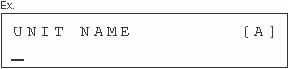
7. Use [Left cursor] or [Right cursor] to select [2 UNIT NAME], then press [OK].
8. Use the numeric keys to enter the unit name (up to 32 characters), then press [OK].
9. Press [Stop/Reset] to return to the standby mode.