





Decorating scenes while converting movies to standard definition
Solution
Decorating scenes while converting movies to standard definition
IMPORTANT
Only AVCHD movies can be converted into standard definition (MPEG2) SD movies.
REFERENCE
For details on down-converting movies, please see Down-converting movies for video-sharing Web sites.
1. When the following screen appears in the process of converting, touch [Next].
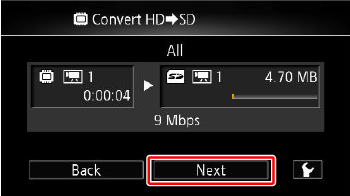
2. Touch [  ].
].
].
3. Select the tool you want to use for decoration.

NOTE
- Conversion will start when you touch [
 ], enabling you to decorate scenes during playback.
 - The image mix function is not available when decorating scenes during playback or scenes being converted to standard definition.
- Touch [
 ] to stop conversion halfway.
 - Please refer to the related information on how to use the decoration tools.