







How to delete/pause/resume a job
Issue
Cause and Solution
You can delete, pause, or resume a job in the Printer Status Window.
1. Start printing.
The Printer Status Window is displayed.
NOTE
The Printer Status Window may not appear depending on the settings for [Display Printer Status Window] in the [Preferences] menu in the Printer Status Window. For details on the References menu, see Related Information at the end of this page.
2. When deleting or pausing the job, click  (Pause Job) in the [Current Print Job] tab or [My Job Operation] tab.
(Pause Job) in the [Current Print Job] tab or [My Job Operation] tab. 
The following message is displayed and the [My Job Operation] tab is selected on the top by clicking  ] (Pause Job) in the [Current Print Job] tab.
] (Pause Job) in the [Current Print Job] tab.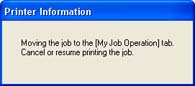
3. Click the button for the desired operation from among the [Job Operation] buttons.
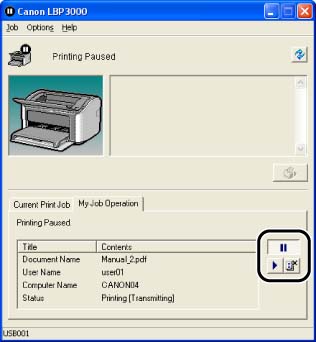
Deleting a Job:
Click  (Delete Job).
(Delete Job).Pausing a Job:
Click  (Pause Job).
(Pause Job).Resuming a Job:
Click  (Resume Job).
(Resume Job).Related Information