





The built-in flash fires by itself (EOS 80D)
Solution
[  ] (Automatic firing) is set to fire automatically in the default settings for the following shooting modes, and based on shooting conditions determined by the camera: <
  > <
> <  > <
> <  :
: 


 > < [
> < [  :
: 


 >. Therefore, if the shooting location is too dark, the built-in flash might fire unexpectedly.
] (Automatic firing) is set to fire automatically in the default settings for the following shooting modes, and based on shooting conditions determined by the camera: < > < > < :
> < [ :
>. Therefore, if the shooting location is too dark, the built-in flash might fire unexpectedly.To turn off auto flash for the built-in flash, either set the shooting mode to <  > (Flash Off), or press the <
  > button to change the flash setting to [Flash off].
> (Flash Off), or press the < > button to change the flash setting to [Flash off].IMPORTANT
[Flash off] cannot be set in [ ] mode.
] mode. 1. Set the camera's power switch to <ON>.
2. Set the shooting mode to < >, < >, < :
>, or < [ :
>.
>, < >, < :
>, or < [ :
>.3. Press the < > button to display the Quick Control screen. (The setting screen for [ ] mode is shown here.)
> button to display the Quick Control screen. (The setting screen for [ ] mode is shown here.)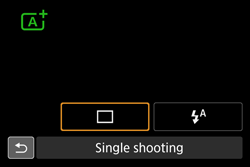
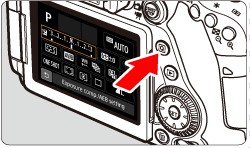
4. Turn the <  > or <
  > dial to select [ ] (Auto built-in flash) or [
  ] (Flash on).
> or < > dial to select [ ] (Auto built-in flash) or [ ] (Flash on).
5. Turn the <  > dial and select [
  ] (Built-in flash off).
> dial and select [ ] (Built-in flash off).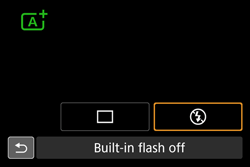
Refer to the following table for more information about which built-in flash settings are available for each shooting mode.
 : Default setting
  : User selectable - : Not selectable
| Function | | | | SCN | | ||||||||||||
 | |  | |  |  | |  | |  |  |
| 


 | |||||
| Built-in flash firing | : Automatic firing | | - | | - | | - | | - | - | | - | | - | | | - |
| : Flash on (Fires at all times) | | - | | | | - | - | | - | | - | | - | | | - | |
| : Flash off | | | | | | | - | | | | | | | | | | |
REFERENCE
In the < :
> and < :
> modes, when you press the shutter button halfway under low-light conditions, the built-in flash may be raised automatically and emit the AF-assist beam. This illuminates the subject to help autofocusing.
:
> and < :
> modes, when you press the shutter button halfway under low-light conditions, the built-in flash may be raised automatically and emit the AF-assist beam. This illuminates the subject to help autofocusing.