Specifications

The machine specifications are subject to change without prior notice due to improvements of the machine.
Machine Specifications
Type Personal Desktop
Power Supply*1 220 to 240 V, 50/60 Hz
(Power requirements differ depending on the country in which you purchased the product.)
Power Consumption Maximum
  • MF244dw / MF241d
    1,150 W or less
  • MF232w
    1,120 W or less
Average consumption during standby mode
  • MF244dw / MF241d
    Approx. 4.1 W
  • MF232w
    Approx. 4.2 W
Average consumption during sleep mode
  • MF244dw
    Approx. 1.3 W (by USB Connections)
    Approx. 1.4 W (by Wired Connections)
    Approx. 2.1 W (by Wireless Connections)
  • MF241d
    Approx. 1.3 W
  • MF232w
    Approx. 1.2 W (by USB Connections)
    Approx. 1.3 W (by Wired Connections)
    Approx. 2.0 W (by Wireless Connections)
When the power switch is turned OFF
  • 0.5 W or less
Warm-up Time*2
(From power ON until machine enters standby)
  • MF244dw / MF232w
    13.5 seconds or less
  • MF241d
    12.0 seconds or less
Weight*3
  • MF244dw
    Approx. 12.7 kg
  • MF241d
    Approx. 11.4 kg
  • MF232w
    Approx. 10.8 kg
Dimensions
(W x D x H)
  • MF244dw
    390 x 371 x 360 mm
  • MF241d / MF232w
    390 x 371 x 312 mm
Environmental Conditions Temperature: 10 to 30°C
Humidity: 20% to 80% RH (no condensation)
Host Interface 100BASE-TX*4
10BASE-T*4
Hi-Speed USB
IEEE 802.11b/g/n (Infrastructure mode)*4
Noise
(measured in accordance with ISO 7779, declared noise emission in accordance with ISO 9296)
LwAd (Declared A-weighted sound power level (1 B = 10 dB))
  • MF244dw
    During standby mode: Inaudible*5
    During printing: 6.6 B or less (1-sided)
    During printing: 6.6 B or less (2-sided)
  • MF241d
    During standby mode: Inaudible*5
    During printing: 6.6 B or less (1-sided)
    During printing: 6.7 B or less (2-sided)
  • MF232w
    During standby mode: Inaudible*5
    During printing: 6.6 B or less (1-sided)
LpAm (Declared A-weighted emission sound pressure level (Bystander position))
  • MF244dw / MF241d
    During standby mode: Inaudible*5
    During printing: Approx. 52 dB (1-sided)
    During printing: Approx. 52 dB (2-sided)
  • MF232w
    During standby mode: Inaudible*5
    During printing: Approx. 51 dB (1-sided)
Acceptable Documents
  Platen Glass Feeder (MF244dw)
Size
(W x L)
Up to 216 x 297 mm Maximum size: 216 x 356 mm
Minimum size: 148 x 105 mm
Weight 50 to 105 g/㎡
Paper Capacity 1 sheet Up to 35 sheets (A4, 80 g/㎡)
Acceptable Paper Stock

Supported Paper Sizes
Paper sizes that can be loaded in the paper drawer, and the manual feed slot are listed below.

A4 (210 x 297 mm)*1
B5 (182 x 257 mm)
A5 (148 x 210 mm)
Legal (216 x 356 mm)*1
Letter (216 x 279 mm)*1
Statement (140 x 216 mm)
Executive (184 x 267 mm)
Oficio (216 x 318 mm)*1
Oficio (Brazil) (216 x 355 mm)*1
Oficio (Mexico) (216 x 341 mm)*1
Letter (Government) (203 x 267 mm)
Legal (Government) (203 x 330 mm)
Foolscap (216 x 330 mm)*1
Foolscap (Australia) (206 x 338 mm)
Legal (India) (215 x 345 mm)*1
F4A (216 x 343 mm)*1
Envelope No. 10 (COM10) (104.7 x 241.3 mm)
Envelope Monarch (98.4 x 190.5 mm)*2
Envelope C5 (162 x 229 mm)
Envelope DL (110 x 220 mm)
3x5inch (76 x 127 mm)*2
Custom*3

*1 Only in MF244dw / MF241d, automatic 2-sided printing is available without replacing paper.
*2 You can load Envelope Monarch and 3x5inch only in the manual feed slot.
*3 Custom paper size of 76.2 to 216.0 mm in width and 210 to 356 mm in length can be loaded in the paper drawer. Custom paper size of 76.2 to 216.0 mm in width and 127 to 356.0 mm in length can be loaded in the manual feed slot.

Paper Type and Paper Source Capacity
Chlorine-free paper can be used with this machine.

Paper Type Paper Capacity for Paper Drawer Paper Capacity for Manual Feed Slot
Plain paper*1 60 to 80 g/㎡ 250 sheets 1 sheet
81 to 89 g/㎡ 170 sheets 1 sheet
Heavy paper*2 90 to 105 g/㎡ 170 sheets 1 sheet
106 to 163 g/㎡ 100 sheets 1 sheet
Recycled paper*1 60 to 80 g/㎡ 250 sheets 1 sheet
81 to 89 g/㎡ 170 sheets 1 sheet
Color paper*1 60 to 80 g/㎡ 250 sheets 1 sheet
81 to 89 g/㎡ 170 sheets 1 sheet
Bond paper*3 60 to 163 g/㎡ 100 sheets 1 sheet
Label 100 sheets 1 sheet
Envelope 20 sheets 1 sheet

*1 Only in MF244dw / MF241d, automatic 2-sided printing is available without replacing paper.
*2 Only in MF244dw / MF241d, automatic 2-sided printing is available for heavy paper 1 (90 to 120 g/㎡).
*3 Only in MF244dw / MF241d, automatic 2-sided printing is available for bond paper 1 (60 to 90 g/㎡) and bond paper 2 (91 to 120 g/㎡).

Printable Range

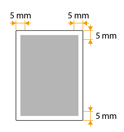
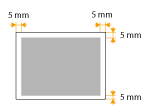
Printable Area
The shaded areas in the image below indicate the printable area of the document.

Scan Range

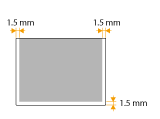
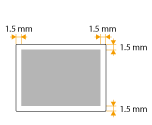
The shaded areas in the table below indicate the scan area of the document. Make sure that text and images in your documents fit within the shaded area. The scan area varies depending on the function used and where documents are placed.

  Platen Glass Feeder (MF244dw)
Copy

The scan area for copying may differ from the printable area.


The scan area for copying may differ from the printable area.
Scan
*1 The current value displayed on the rating label indicates average current consumption.
*2 Warm-up time may vary depending on the use conditions and environment of the machine.
*3 The value indicates the mass of the main unit including toner cartridges.
*4 MF244dw / MF232w only
*5 Indicates that the sound pressure level of each bystander position is below the ISO 7779 absolute criteria for the background noise level.

Wireless LAN Specifications (MF244dw / MF232w)
Standard IEEE 802.11g, IEEE 802.11b, IEEE 802.11n
Frequency Range 2,412 to 2,472 MHz
Communication Mode Infrastructure Mode / Access Point Mode
Security Infrastructure Mode
  • WEP, WPA-PSK (TKIP/AES-CCMP), WPA2-PSK (TKIP/AES-CCMP)
Access Point Mode
  • WPA2-PSK (AES-CCMP)
Connection Method WPS (Wi-Fi Protected Setup), Manual setup

Copy Specifications
Scan Resolution Text/Photo (High Speed)
  • 300 x 600 dpi
Text/Photo, Photo, Text
  • 600 x 600 dpi
Output Resolution 600 x 600 dpi
Copy Ratio 100% 1:1, 400% Max, 200%, 141% A5->A4, 122% A5->B5, 115% B5->A4, 86% A4->B5, 81% B5->A5, 70% A4->A5, 50%, 25% Min
Copy Speed*1
(A4 Plain 1:1)
MF244dw / MF241d
  • 27 cpm
MF232w
  • 23 cpm
Continuous Copying Capacity Maximum 999 copies
First Copy Time
(A4)
Platen glass: 9 seconds or less
Feeder*2: 14 seconds or less
*1 The copy speed on A4 size plain paper on one-side printing is measured during continuous copying. Copy speeds vary depending on the output resolution, the paper type and size, and the paper feeding direction. Copy speeds on smaller paper sizes may be slower. Plus, the machine may experience downtime or decrease the copy speed in the middle of a continuous copy run to adjust the temperature inside the machine or maintain the optimal print quality.
*2 MF244dw only.

Scanner Specifications
Type Color scanner
Maximum Scan Size Platen glass: up to 216 x 297 mm
Feeder*1: up to 216 x 356 mm
Scan Resolution Optical resolution
  • Platen glass: up to 600 x 600 dpi
  • Feeder*1: up to 300 x 300 dpi
Software interpolation resolution
  • 9,600 x 9,600 dpi
Scan Speed*2 (A4, 300 x 300 dpi) Color: Approx. 4 seconds/sheet
Black and White: Approx. 3 seconds/sheet
Driver TWAIN
WIA 2.0
ICA
*1 MF244dw only.
*2 Speed of scanning via the platen glass. The communication time is not included.

Printer Specifications
Output Tray Capacity*1
(a fresh stack of A4 size paper)
Approx. 100 sheets (68 g/㎡)
Print Speed*2
(A4 Plain 1:1)
MF244dw / MF241d
  • 27 ppm
MF232w
  • 23 ppm
First Print Time*3
(A4)
6 seconds or less
Print Resolution 600 dpi x 600 dpi (1,200 dpi equivalent x 1,200 dpi equivalent)
Gradation 256 gradations
Toner Cartridges Canon Cartridge 337
*1 May vary depending on the installation environment and paper type used.
*2 The print speed on A4 size plain paper on one-side printing is measured during continuous printing. Print speeds vary depending on the output resolution, the paper type and size, and the paper feeding direction. Print speeds on smaller paper sizes may be slower. Plus, the machine may experience downtime or decrease the print speed in the middle of a continuous print run to adjust the temperature inside the machine or maintain the optimal print quality.
*3 May vary depending on the output environment.