





How do I set the Date/Time?
Solution

1. Turn on the camcorder.
2. Press the <FUNC.> button.
3. Use the joystick <  > to select the [
  MENU] icon and press <
  >.
>.
> to select the [ MENU] icon and press < >.
4. Use the joystick < > to select the [  DATE/TIME SETUP] menu and press < >.
> to select the [ DATE/TIME SETUP] menu and press < >.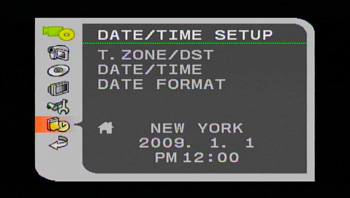
5. Use the joystick < > to select the [T.ZONE/DST] option and press < >.
> to select the [T.ZONE/DST] option and press < >.- The time zone setting appears. The default setting is New York.
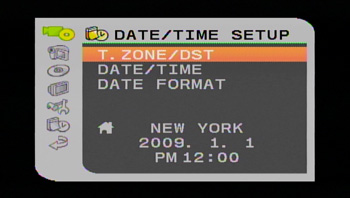
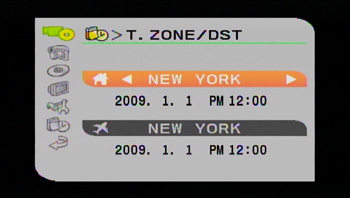
6. Use the joystick <  > to select your time zone and press < > to save the setting.
> to select your time zone and press < > to save the setting.- To adjust for daylight saving time, select the area name marked with a  .
.
.
1. Use the joystick < > to select the [DATE/TIME] option and press < >.
> to select the [DATE/TIME] option and press < >.- The year display is marked with an orange selection frame.

2. Use the joystick < > to select the year and push it to <  > to move to the month setting.
> to select the year and push it to < > to move to the month setting.- The orange selection frame moves to the next display.
- Set the month, day, hours and minutes in the same way.
- If you do not need to change all settings, you can use the joystick < > to move to a specific setting you want to change.
> to move to a specific setting you want to change.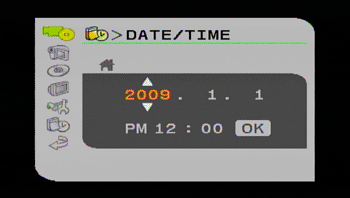
3. Use the joystick < > to select [OK] and press < > to start the clock.
> to select [OK] and press < > to start the clock.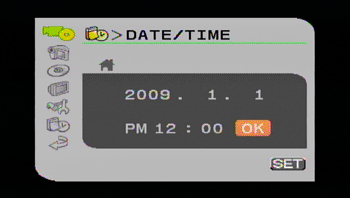
CAUTION
- When you do not use the camcorder for about 3 months, the built-in rechargeable battery may discharge completely and the date and time setting may be lost. In such case, recharge the built-in battery and set the time zone, date and time again.