








Shooting subjects up close (PowerShot SD4500 IS / IXUS 1000 HS)
Solution
If you are shooting a subject at a close distance, and if the subject cannot be easily focused within the normal shooting range, switching the normal mode to the [Macro] ( ) mode will make it easier to focus on the subject.
) mode will make it easier to focus on the subject. NOTE
The distance of each focusing range is as follows (from the end of the lens): If you shoot beyond the following ranges, the subject may be out of focus.
- [Normal] (
 ) : 1 cm (0.4 in.) – infinity (W)* / 1 m (3.3 ft.) – infinity (T)**
 - [Macro] () : 1 – 50 cm (0.4 in. – 1.6 ft.) (W)*
* (W): When turning the <Zoom Lever> toward <Wide Angle> ( ) to the maximum wide angle side (Max. wide angle).
) to the maximum wide angle side (Max. wide angle).** (T): When turning the <Zoom Lever> toward <Telephoto> ( ) to the maximum telephoto side (Max. telephoto).
) to the maximum telephoto side (Max. telephoto).CAUTION
- The following explanations are provided based on the assumption that the [Shooting Mode] is set to [Program] (
 ) .
) . - The edges of the image may darken if the flash fires.
- To set the [Macro] (), it is necessary to set the [Shooting Mode] to one of the following modes.
- [Program] (), [High-speed Burst] ( ), [Color Accent] (
 ), [Color Swap] (
 ), [Handheld NightScene] (
 ), [Stitch Assist] (
 ), [Movie] (
 ), [Super Slow Motion] (
 ), [Color Accent (Movie)] (
 ), [Color Swap (Movie)] (
 )
)
), [High-speed Burst] (), [Color Accent] (), [Color Swap] (), [Handheld NightScene] (), [Stitch Assist] (
), [Movie] (), [Super Slow Motion] (), [Color Accent (Movie)] (), [Color Swap (Movie)] ()1. Set the <Mode Switch> to  [Shooting] (
 ) and then press
  the <Power> button.
[Shooting] () and then press the <Power> button.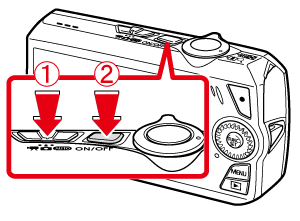
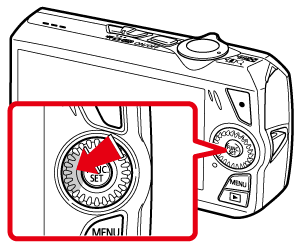
2. Press the left <directional button> (<Macro / Manual Focus> ( /  )).
)).
/ )).
3. The following screen appears.
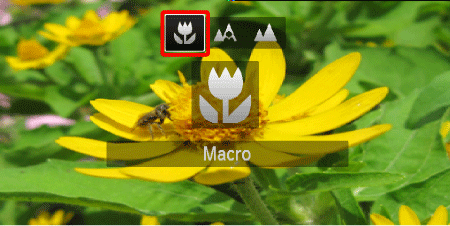
Operate the <directional buttons> left or right to set [Macro] (), then press the <FUNC./SET> ( ) button.
), then press the <FUNC./SET> () button.If [Macro] () is indicated on the LCD Monitor, the camera is in [Macro] () mode.
) is indicated on the LCD Monitor, the camera is in [Macro] () mode.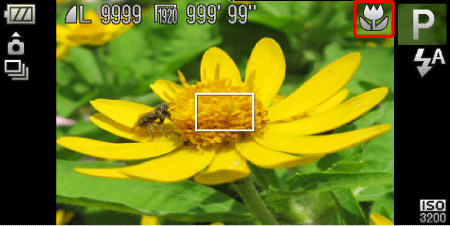
REFERENCE
Try attaching the camera to a tripod and shooting in [2 sec. Self-Timer]( ) to prevent the camera from moving and blurring the image
) to prevent the camera from moving and blurring the imageNOTE
- The screen indications when operating the <Zoom lever> in [Macro] () mode are as follows.

When you move the <Zoom lever>, the [Zoom bar] appears on the screen.
the [Zoom bar] appears on the screen.The camera cannot focus in the yellow portion of the bar (When zooming within the range of the yellow bar,  (
( ) will be grayed out and shooting will be done in ().
yellow portion of the bar (When zooming within the range of the yellow bar, () will be grayed out and shooting will be done in ().