





When Memory card slot A becomes full, will the recording be automatically saved to Memory card slot B (relay recording)?
Solution
You can activate the relay recording so if the memory you are using becomes full while recording movies, the recording will continue automatically on a memory card.
When recording on memory card A, you can use memory card B for relay recording (  ).
).
). Confirm the following information regarding the relay recording settings.
1. Insert a memory card that contains no video recordings into the card slot  .
.
.2. Turn on the camcorder.
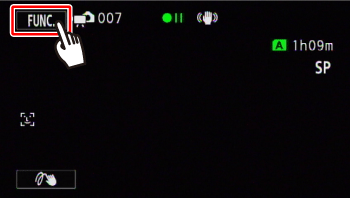
3. Touch [  ].
].
].
4. Touch [ MENU ].
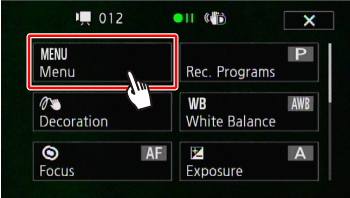
5. Touch [  ].
].
].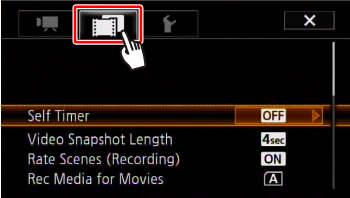
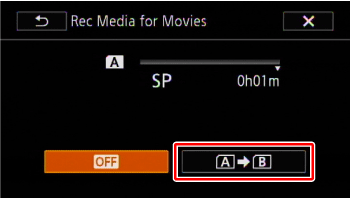
6.  Drag your finger up and down bring [ Rec Media for Movies ] into the orange selection bar,
  and touch inside the frame on the right.
Drag your finger up and down bring [ Rec Media for Movies ] into the orange selection bar, and touch inside the frame on the right.
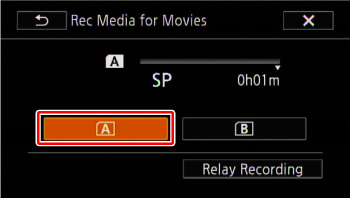
7. Touch [  ].
].
].
8. Touch [Relay Recording].
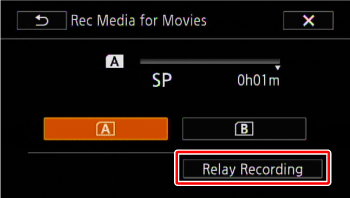
9. Touch [ ].
].
10. Touch [  ] to close the menu.
] to close the menu.NOTE
- There will be a momentary stop in the scene at the point where the recording switched to a different memory.
- Any of the following actions will deactivate the relay recording function:
- Turning off the camcorder.
- Opening the double memory card slot cover.
- Changing the camcorder's operating mode.
- Changing the memory used for recording movies.