








Adding a Date Stamp when Shooting
Solution
The camera can add the shooting date to images, in the lower-right corner.
IMPORTANT
- Note that date stamps cannot be edited or removed, so confirm beforehand that the date and time are correct.
REFERENCE
- For setting or changing the date and time, refer to Setting or Changing the Date and Time.
- In some shooting modes it may not be possible to configure the [Date Stamp] setting.
NOTE
- The position and shape of the operation buttons, screens displayed, and setting items may differ according to the model you use.
- In this example, the procedure is shown on a PowerShot S110 set to the [Program AE] (P) shooting mode.
The procedure for adding a date stamp to images during shooting is explained below.
1. Press the <Power> button to turn the camera on.
2. Press the <MENU> button.
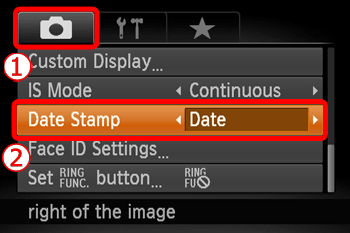
3. The following screen is displayed.
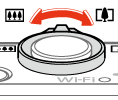

 : Zoom lever
  : Left button
  : Right button
  : Up button
  : Down button
 Move the zoom lever to choose the [
  ] tab.
Press the Up or Down buttons to choose  [Date Stamp]
[Date Stamp]Press the Right or Left buttons to choose [Date] or [Date & Time].
Press the <MENU> button.
4. When [Date Stamp] is set to [Date] or [Date & Time], [DATE] is displayed on the LCD monitor.
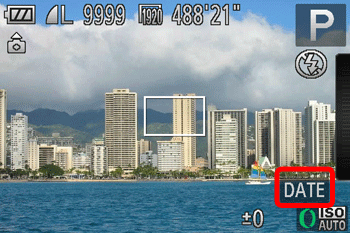
If [DATE] does not appear, press the <DISP.> button several times to change the information displayed on the screen.
5. The [Date Stamp] will be added to the images as shown below:
 [Date] [Date & Time]
NOTE
It is not possible to edit the displayed date, color, style, or position of date stamps.
Shooting modes in which the [Date Stamp] setting can be configured:
| Models | Shooting Modes | ||||||||||||||
 , ,  , ,  |  |  , ,  |  |  |  |  |  |  |  |  |  |  |  |  | |
| PowerShot SX160 IS |  | | |  | | | | | | | | | | | |
| PowerShot SX50 HS | | | | | | | | | | | | | | | |
| PowerShot S110 | | | | | | | | | | | | | | | |
| PowerShot SX500 IS | | | | | | | | | | | | | | | |
| PowerShot SX270 HS PowerShot SX280 HS | | | | | | | | | | | | | | | |
| PowerShot G15 | | | | | | | | | | | | | | | |
| PowerShot A1400 PowerShot A2500 PowerShot A2600 PowerShot A3500 | | | | | | | | | | | | | | | |
| PowerShot ELPH 130 IS PowerShot ELPH 115 IS PowerShot ELPH 120 IS IXUS 140 IXUS 132 IXUS 135 | | | | | | | | | | | | | | | |
| PowerShot ELPH 330 IS IXUS 255 HS | | | | | | | | | | | | | | | |
...[Date Stamp] can be added...Shooting mode not available