








Onscreen Icons and Displays (VIXIA mini X)
Solution
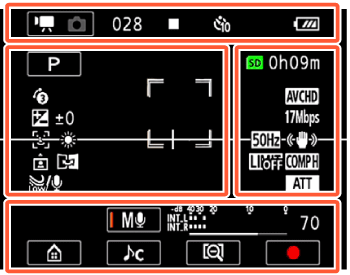
Icons on the top of the screen
| Icon | Description/Function |
|---|---|
 | The left side shows the current recording mode (movie or photo mode) while the right side shows the new recording mode when this control button is touched. |
| 00:00:00:00 (for AVCHD movies) | Time code (hours : minutes : seconds : frames) |
| 0:00:00 (for MP4 movies) | Scene counter (hours: minutes : seconds) |
| 000 (for AVCHD movies) | Total number of scenes |
 | Memory card operation |
 | Self timer and countdown |
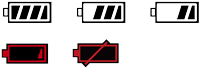 | Remaining battery charge |
Icons on the left side of the screen
| Icon | Description/Function |
|---|---|
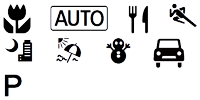 | Shooting mode button (In  mode: Smart AUTO icons) mode: Smart AUTO icons) |
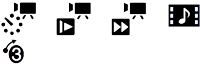 | Special recording modes and, if appli- cable, an icon indicating an interval of time for that function. |
 ±0 ±0 | Exposure compensation |
 | Face detection. When a face is detected, a white frame will also appear around the main subject's face. |
 | White balance |
 | Onscreen markers |
 | User-selected face detection frame |
 | Orientation detection |
 | Mirror image recording |
 | Built-in microphone's wind screen |
Icons on the right side of the screen
| Icon | Description/Function |
|---|---|
 0h00m 0h00m | Remaining video recording time |
| 0000 | Remaining available number of photos |
| LPCM | Linear PCM audio |
 | Movie format |
| L M S | Photo size |
 | Frame rate |
| 24 Mbps 17 Mbps 4 Mbps | Video quality |
| Onscreen markers |
| User-selected face detection frame |
 | Flicker reduction |
 | Image stabilizer |
 | Audio limiter |
 | Audio compressor |
 | Built-in microphone attenuator |
Icons on the bottom of the screen
| Icon | Description/Function |
|---|---|
 | button: Open the (Home)menu |
 | Audio scene button: Change the audio scene. |
  | Audio recording mode button and audio level indicator: Switch between manual and automatic audio record- ing level |
 |  / /  button: Change the field of view button: Change the field of view |
| |  / /  button: Start/Stop recording a movie button: Start/Stop recording a movie |
| PHOTO | [PHOTO] button: Take a photo |
Icons on the top of the screen
| Icon | Description/Function |
|---|---|
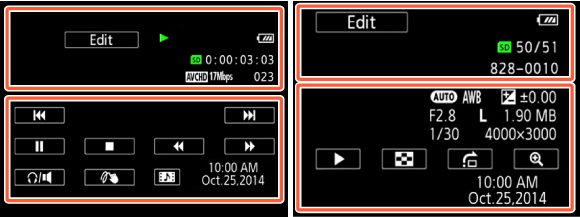
| button: Mirror image playback |
 | button: Repeat playback |
| Edit | [Edit] button: Open the [Edit] panel |
 | Memory card operation |
 | Interval scenes that have not yet been joined. Slow/Fast motion and playback speed. |
| LPCM | Linear PCM audio |
Icons on the top of the screen (cont.)
| Icon | Description/Function |
|---|---|
| 00:00:00:00 (for AVCHD movies) | Scene playback time code (hours : minutes : seconds : frames) |
| 0:00:00 (for MP4 movies) | Scene playback time (hours: minutes seconds) |
| 00/00 | Current photo / Total number of photos |
| Movie format |
| 24 Mbps 17 Mbps 4 Mbps | Video quality |
| 000 | Scene number |
| 000-0000 | File number |
Icons on the bottom of the screen
| Icon | Description/Function |
|---|---|
For movies: | Playback control buttons |
For photos: | button: Slideshow |
Icons on the bottom of the screen (cont.)
| Icon | Description/Function |
|---|---|
 | button: Volume |
| PHOTO | [PHOTO] button: Capture a photo |
 | button: Decoration |
 | button: Capture a video snap- shot scene |
 ±0.00 F2.8 L ±0.00 F2.8 L1.90 MB 1/250 4000×3000 | Shooting information |
 | button: Return to the  index screen index screen |
 | button: Photo jump |
| / button: Increase/decrease magnification for photo playback |
| 10:00 AM Oct. 25, 2014 | Recording date and time |
REFERENCE
- Time code/Scene counter
Both the time code and scene counter are counters that advance only when recording. The time code starts at 0:00:00:00 every time you record a new scene.
- Memory card operation
 Record, Recording standby, Playback,
  Playback pause,
  Fast playback,
 Fast reverse playback,
  Slow playback / Slow reverse playback,
  Frame advance / Frame reverse.
- Remaining battery charge
- The icon shows a rough estimate of the remaining charge of the battery pack.
- When the battery charge becomes low, replace or charge the battery pack. Depending on the condition of the camcorder or battery, the actual battery charge may not match what is displayed on the screen.
- When you insert an empty battery pack, the power may turn off without displaying  .
.
.- Special recording modes
 - Interval recording and selected interval
  - Slow motion and selected speed
  - Fast motion and selected speed - Video snapshot and selected video snapshot length
 - Pre-recording
 - Remaining video recording time
When there is no more free space on the memory card, and [End] will be displayed (in red) on the screen and the recording will stop.
and [End] will be displayed (in red) on the screen and the recording will stop.- Remaining available number of photos
Even if the remaining number of photos that can be recorded is larger, the maximum number displayed on this screen is [9999].
- Shooting information
Shooting mode,  White balance,±0.00 Exposure, F2.8 Aperture number,
1/250 Shutter speed, L 4000×3000 Photo size,
1.90 MB File size